My Hume Pod Died. Turns Out It Just Needed a Charge.
I bought the Hume Pod — one day it stopped working. Turns out it just needed a charge. A technical guide to diagnosing Hume Pod issues.
A few months ago, I bought the Hume Pod. One day, it stopped working. This entry documents what happened — and serves as a technical guide for others.
Before the failure, I noticed the scale required more force to activate. One day, I stepped on it as usual — it read 300 kg. Something was clearly wrong. The screen went off. I suspected the erroneous reading had damaged the sensor. The next day, the screen wouldn't turn on at all. I assumed the battery was dead, so I charged it. While charging, the screen lit up — but went dark again the moment I unplugged it.
I considered buying a new scale. But my engineering mindset wouldn't allow it — the hardware might be fully intact, needing only a small component replaced.
Literature Review
A quick search returned no repair guides for the Hume Pod. Their official website offered nothing — no circuit diagrams, no disassembly instructions. I did not contact customer support. On April 2, an anonymous user posted in a Facebook group asking if anyone knew how to open the Hume Pod for inspection. No useful answer followed. At least I was not alone.
On the product label, alongside the model, size and battery details, I found the identifier FCC ID: 2AVEN-CF577. A search led me to the FCC registry, where the ID was registered to Shenzhen Unique Scales.
A post in r/HumeHealth by user Infinite-Demand-7345 summarized how direct segmental multi-frequency bioelectrical impedance analysis (DSMF-BIA) works. The Hume Pod was noted as a standout device for reporting all key body composition markers and supporting dual-frequency measurement. The post also identified Shenzhen Unique Scales as the manufacturer.
A separate post in r/HumeHealth by emolinare introduced Blue2Scale — an open-source web app that connects the scale to a browser-based dashboard. I haven't tried it, but it may be worth exploring.
The Hume Health website states the Body Pod uses 20 kHz and 100 kHz frequencies across 8 sensors, performing 64 measurements per scan. Kalman filters are applied to reduce measurement artifacts. This may interest anyone building a custom integration.
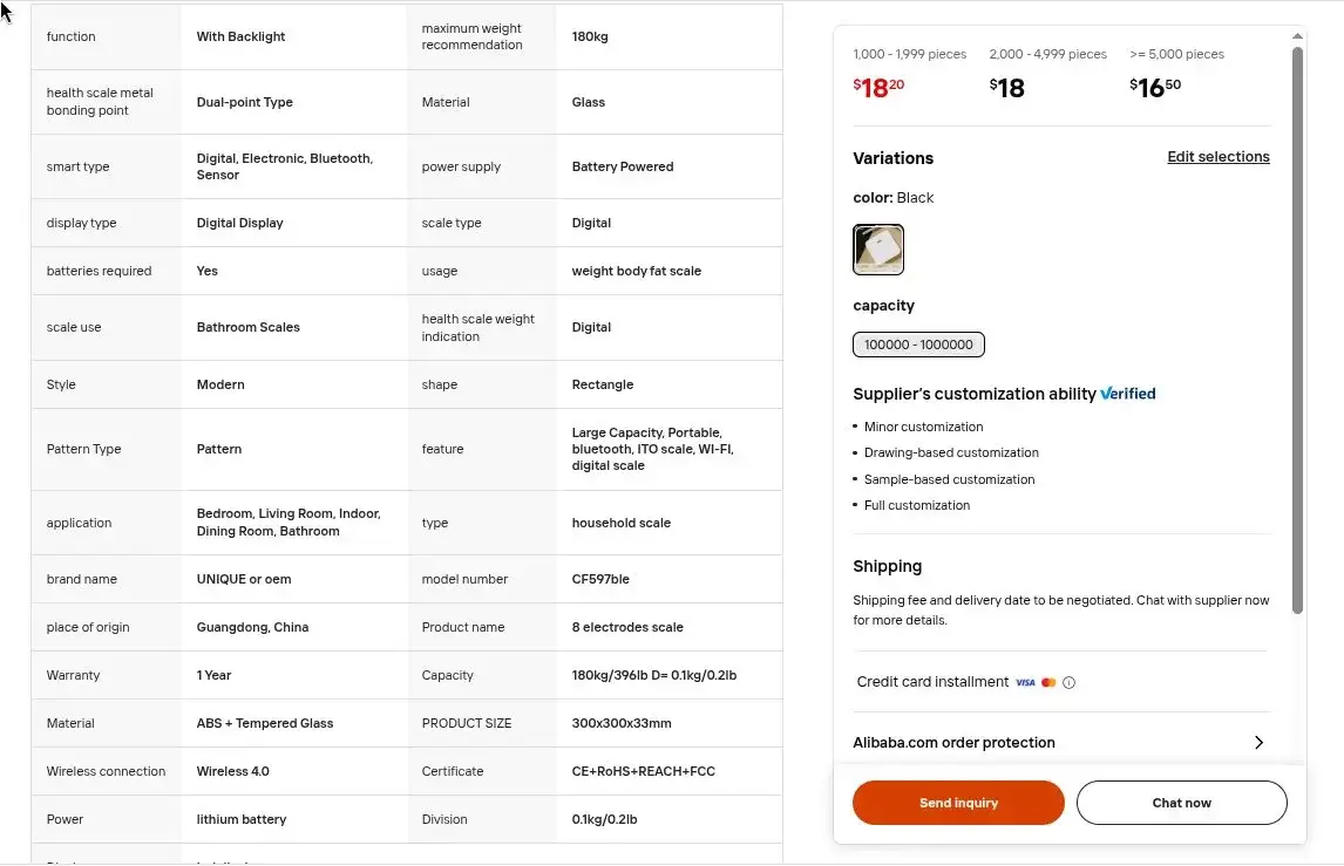
The same scale appears on Alibaba for approximately $18 USD, under model CF597BLE — a number I later confirmed printed on the PCB. Shenzhen Unique Scales lists the device under the TUYA ecosystem, measuring 51 parameters. The listing does not specify frequencies, though it mentions a dual-frequency chip. Whether it truly operates at two frequencies remains unconfirmed (I later confirmed that the chip BH66F2663 supports multi-frequency).
No repair guide existed. I was on my own.
Inspection
I opened a chat with Claudio — my nickname for Claude — and described the symptoms and my initial suspicion: a damaged pressure sensor. Claudio suggested three possible causes:
| Cause | How to Test |
|---|---|
| Damaged or depleted battery | Charge for 2–3 hours, then step on the scale |
| Damaged or disconnected strain gauge | Measure voltage with a multimeter |
| Battery management circuit fault | Measure voltage with a multimeter |
Tools used: multimeter, plastic picks, Claude Opus.
Disclaimer: This guide assumes you know what you are doing. Do not put yourself or others at risk. Batteries can catch fire if punctured or short-circuited.
Opening
The first challenge is opening the scale. I used the plastic picks included in most smartphone opening kits. Some scales have hidden screws beneath the rubber feet — the Hume Pod does not. It consists of two solid plastic pieces: the top plate and feet are one unit, enclosed by a bottom shell.
To separate them, slide a thin plastic card or pick into the gap between the glass perimeter and the plastic shell. Once the card is in, use a small flat-head screwdriver — the kind used for phones — to gently lever the corners apart. No force is needed; this step is delicate. You will notice the clips releasing one by one around the perimeter. Repeat this for each corner until the shell comes free.
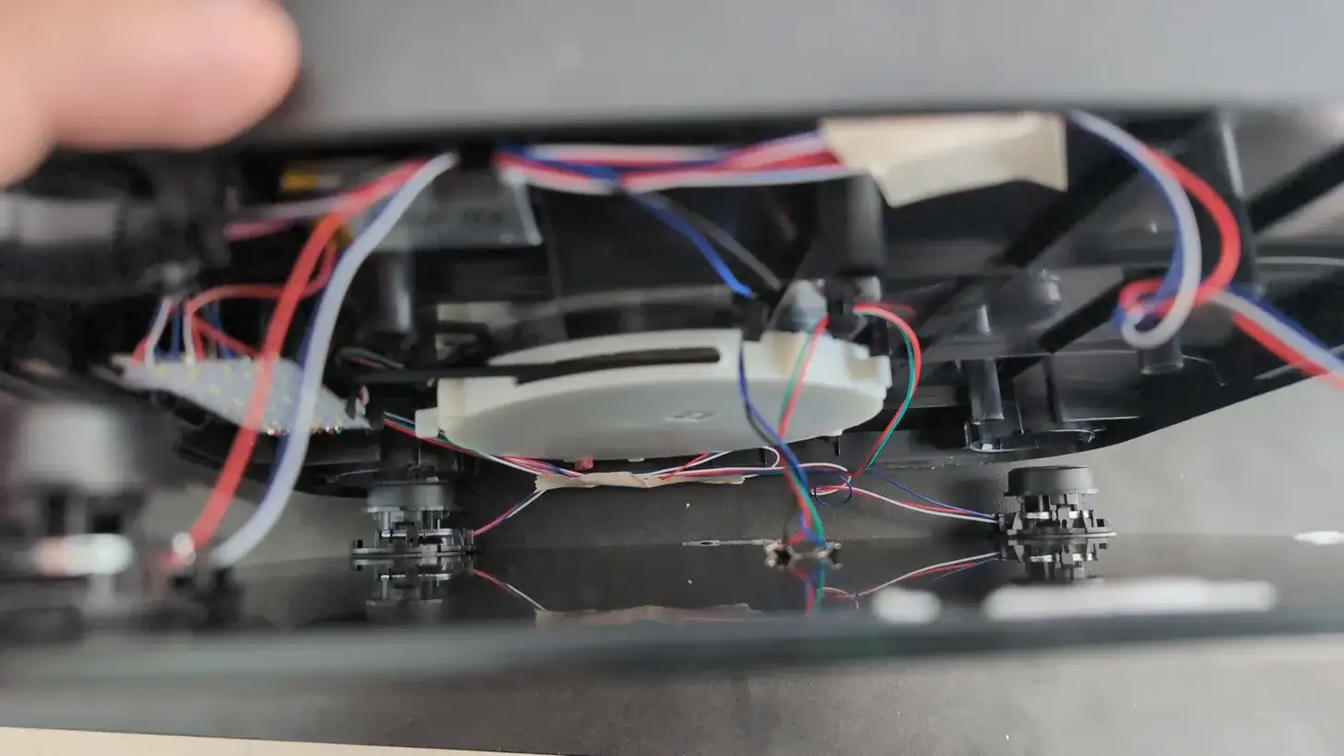
Once open, the two halves remain connected by cables. A visual inspection revealed no damage, no loose connections, nothing out of place. The case contained four strain gauges, a central PCB with an LED panel, a retractable cable storage unit, and the battery.
All cables were connected to the PCB. To go deeper without disconnecting them, the PCB had to be removed from its housing. The board is held by plastic clips — release the lower clips first while pushing the PCB upward from below, then release the upper clips.
Testing Battery Health
Visually, the battery showed no signs of swelling, corrosion, or burn damage. All cables appeared securely connected. The Alibaba listing identified it as a 500 mAh lithium battery.
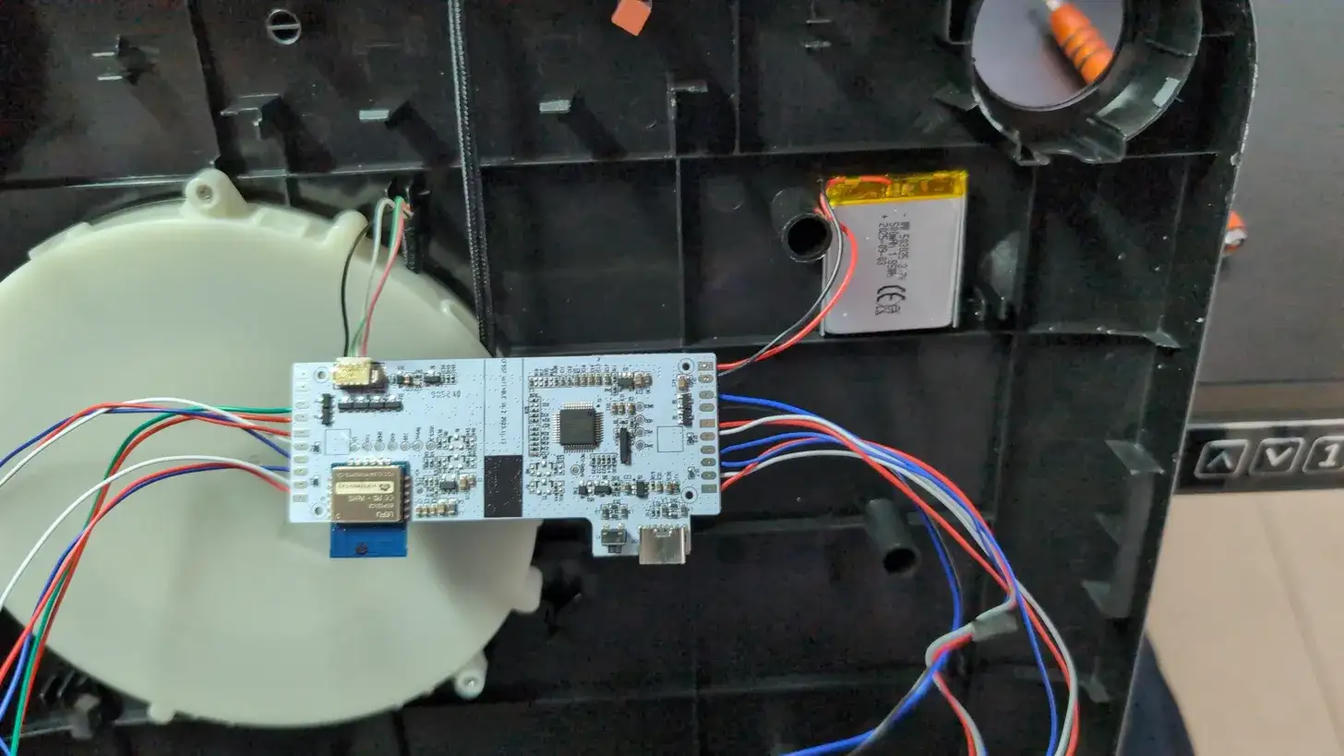
Using a multimeter, I measured the voltage directly at the battery connector terminals on the PCB (labeled BAT+ and BAT−). The reading was 3.52 V. Claudio provided a diagnostic reference:
| Reading | Diagnosis |
|---|---|
| 3.6–4.2 V | Healthy and charged — fault lies elsewhere |
| 3.0–3.6 V | Depleted — recharge and retest |
| 2.5–3.0 V | Over-discharged — likely blocked by BMS |
| < 2.5 V | Dead battery — replacement required |
| 0 V | Fully dead battery or severed internal cables |
At 3.52 V, the battery was not fully depleted — yet the scale wouldn't power on. This suggested a BMS protection circuit blocking operation until the battery reaches a minimum charge threshold.
To confirm the charger was delivering current, I connected the charging cable and measured the terminals again. The voltage read 3.66 V and was climbing steadily. The charger was working. I left the battery charging and moved on to the strain gauges.
Testing the Strain Gauges
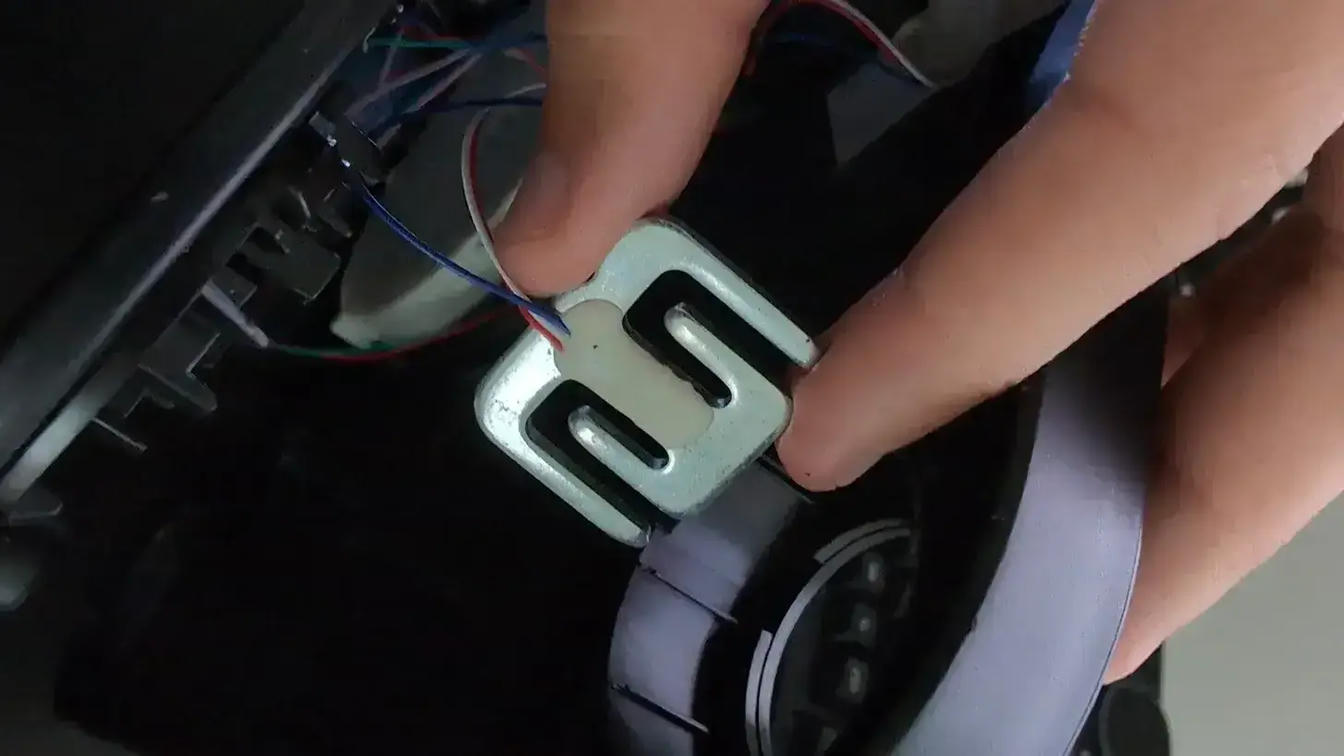
Each strain gauge has three cables: red, blue, and white. Three resistance measurements are required:
| Measurement | Probes |
|---|---|
| A | Red (R) vs. Blue (B) |
| B | Red (R) vs. White (W) |
| C | White (W) vs. Blue (B) |
Each gauge uses a half-bridge configuration — three cables instead of four. The four corner sensors combine on the PCB to form a single Wheatstone bridge. Cable roles: red is excitation, white is signal, blue is ground.
Expected resistance is approximately 1000 $\Omega$ per leg — actual readings vary, see the analysis below.
| Sensor | A ($\Omega$) | B ($\Omega$) | C ($\Omega$) | B+C ($\Omega$) | Difference B-C |
|---|---|---|---|---|---|
| 1 | 1530 | 878 | 879 | 1757 | 1$\Omega$ (0.1%) |
| 2 | 1500 | 878 | 856 | 1734 | 22$\Omega$ (2.5%) |
| 3 | 1504 | 870 | 878 | 1748 | 8$\Omega$ (0.9%) |
| 4 | 1491 | 855 | 869 | 1724 | 14$\Omega$ (1.6%) |
What to look for: all four sensors should read approximately equal values, and B + C ≈ A. Inconsistent values may indicate a damaged cell, a broken internal wire, or a shorted sensor.
On $B+C > A$ ($~1750$ vs. $1500$ $\Omega$): this is expected. The internal configuration is not two simple resistances in series, but a more complex network with branch points. This is normal behavior in real strain gauges.
On internal balance (B vs. C): the maximum deviation across sensors is 2.5%. This is within normal range — a real strain gauge at rest is never perfectly balanced due to minor mechanical imperfections in the metal foil.
All four sensors read within acceptable range. The strain gauges were not the cause of failure.
Identifying the MCU
The PCB carries two key chips:
- LEFU ESP32-C2 — a Wi-Fi + BLE module, responsible for wireless connectivity.
- Holtek BH66F2663 — the main MCU.
The Holtek is the more interesting one. According to its datasheet, the BH66F2663 is a Flash MCU specifically designed for impedance phase angle measurement.
It includes:
- A built-in BIA (Bio-Impedance Analysis) module
- multi-frequency band support
- Support for 4 or 8 electrode body composition measurements
This means the multi-frequency claim from Hume Health is technically plausible — the silicon supports it. Whether the firmware actually operates at 20 kHz and 100 kHz cannot be confirmed without an oscilloscope, but the capability exists.
The board itself is labeled CF597BLE V1.2 2023.11.13 — confirming the model number from the Alibaba listing.
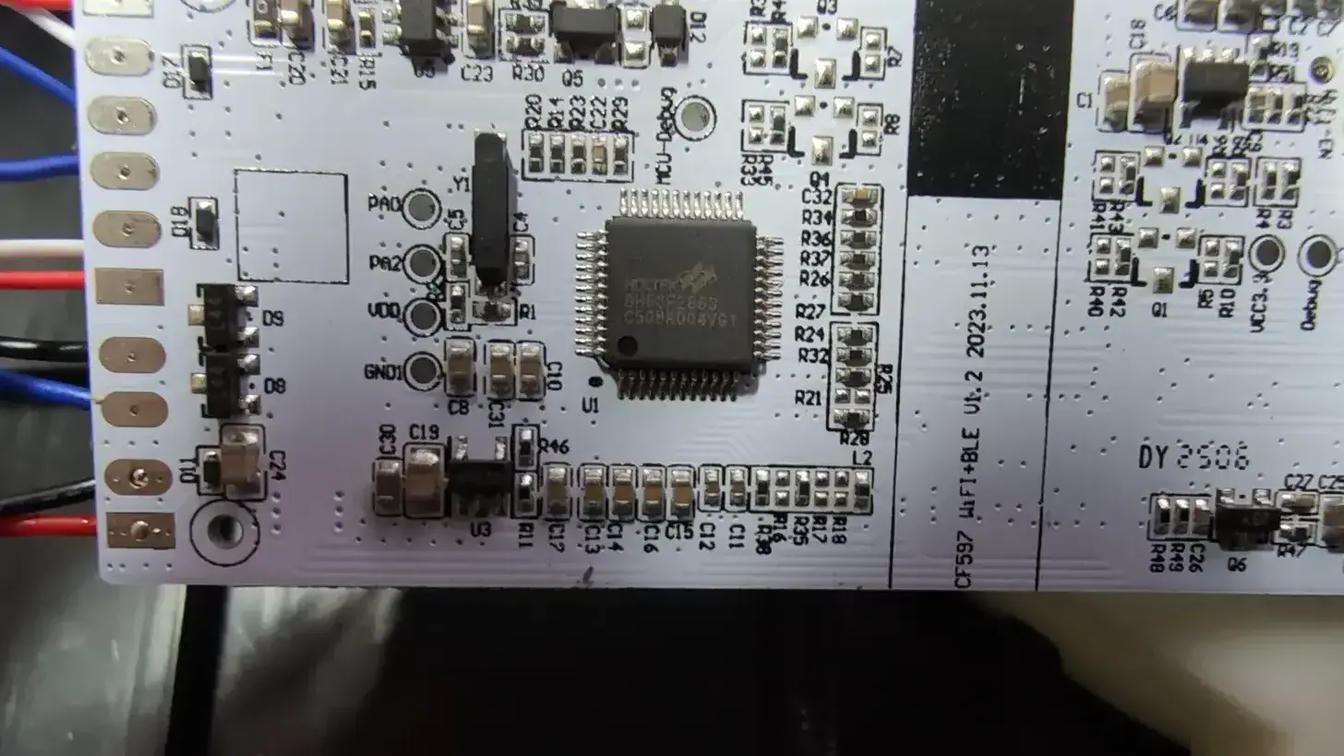
Properly testing the MCU itself would require a debugger (such as a J-Link or ST-Link) connected to the MCU-Debug pads visible on the PCB. With a debugger, it would be possible to read firmware logs, inspect register states, and confirm whether a battery threshold check is blocking startup. I did not have a debugger available, so this remains a hypothesis.
Resolution
After testing the battery, strain gauges, and MCU, no clear failure point had emerged. Every component appeared functional. The only anomaly was the low battery voltage — noted early, then left to charge while I worked through the other modules.
With testing complete, I reassembled the scale. The battery had reached 4.0 V. I stepped on it. The display lit up. The reading was correct.
The fix was a full charge. Nothing more.
This is Occam's razor in practice: when every complex explanation fails, the simplest one remains.
What I still don't know: why the initial charge didn't resolve it, and why — after months of disuse — it simply worked.
Conclusion
I thought the scale was broken. It just needed a charge.
Along the way, I found no existing repair guide for the Hume Pod — so this is it. Working through each component with Claudio, I initially suspected the pressure sensors. The battery was the culprit, though I still don't know why previous charges failed and this one didn't.
The teardown revealed more than a fix. The Hume Pod is a rebrand of a Shenzhen Unique Scales product available on Alibaba for around $18 — a 10x to 16x markup. The hardware includes a dual-frequency chip, something I initially doubted until I found it on the PCB itself.
One question remains: is the Hume Health app meaningfully different from TUYA — or is the premium justified by software alone?